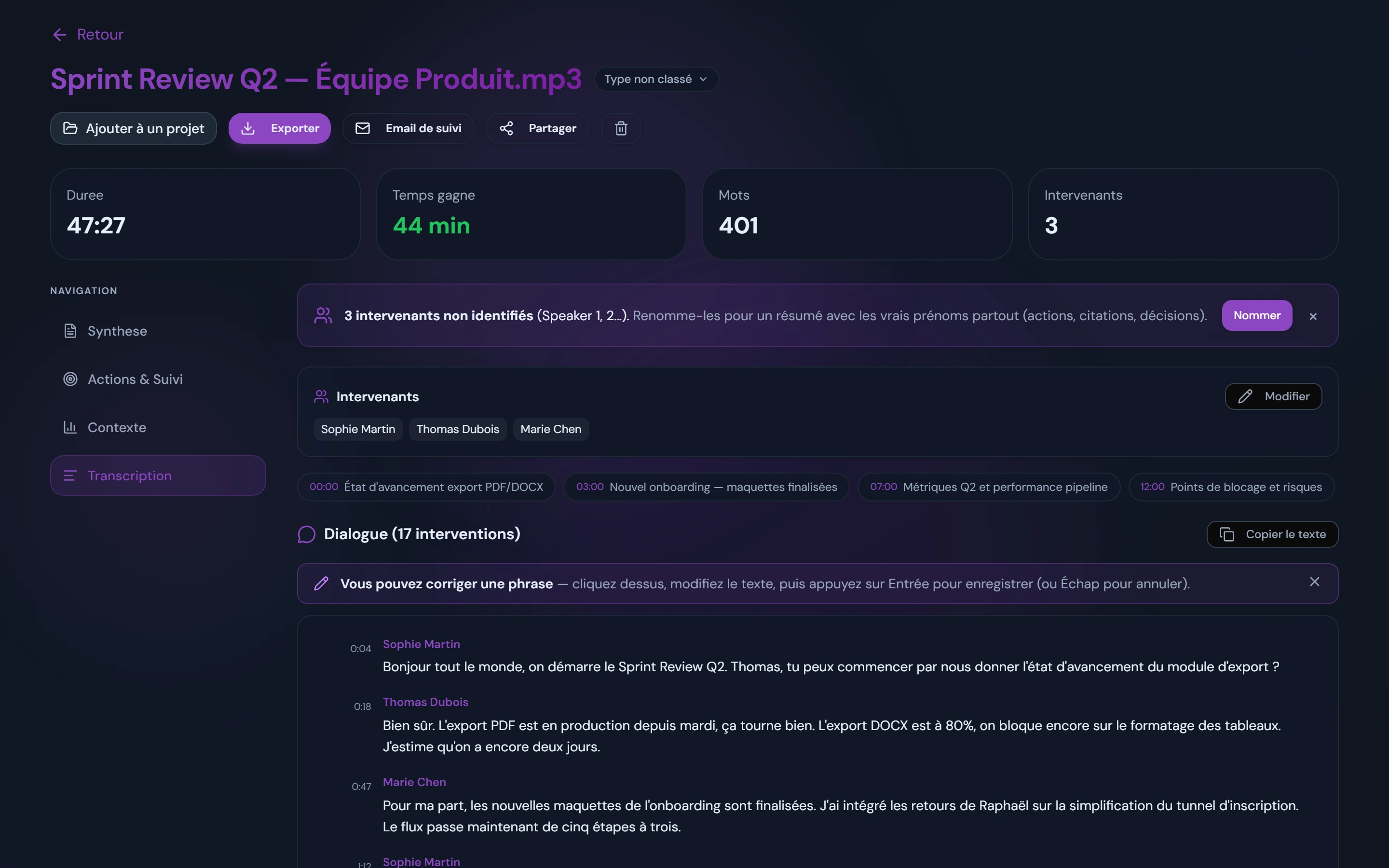
In short. Interview transcription means converting an audio or video recording into usable text. Manually, one hour of audio takes at least 3 hours of work, and up to 10 for a detailed transcript (Bailey, 2008). With an automatic tool like AudiosTranscribe, processing a typical interview takes a few minutes: a detailed transcript with voices separated automatically (names assigned in one click) and a structured summary, ready for your review.
The time math
What is interview transcription?
Interview transcription is the faithful conversion of a recorded spoken exchange into text. It turns raw speech, with its hesitations, follow-up questions and silences, into a written document you can analyze.
It is a central step in qualitative research, HR and consulting. Without it, the data stays out of reach. It is closely related to meeting transcription, but with constraints specific to qualitative work (faithful verbatim, anonymization).
Verbatim vs structured summary: what is the difference?
Verbatim transcribes every word spoken, including hesitations, repetitions and spoken turns of phrase. It is the reference format in the social sciences: it allows fine-grained discourse analysis, exact wording and shades of meaning.
The structured summary condenses the exchange by theme or decision. Faster to read, it suits HR interviews, client meetings or audits where you are after conclusions, not linguistic analysis.
Worth remembering. The two formats are not mutually exclusive. AudiosTranscribe produces both from a single upload: a detailed transcript to review on one side, a structured summary on the other.
Full verbatim vs intelligent (clean) verbatim
Full verbatim keeps fillers, false starts, repetitions and non-verbal cues, which discourse and conversation analysis require. Clean (intelligent) verbatim removes the noise words without changing meaning, which suits HR records, client deliverables and published quotes. Either way, you start from the automatic transcript and bring it to the style you need during review, adding any notation (such as the Jefferson system) by hand. For both styles side by side, see full vs clean verbatim, with examples.
Why transcribe a qualitative interview?
Transcribing an interview makes the data analyzable. An audio recording cannot be coded, quoted or indexed. Text can.
In social science research, transcription is often required in order to:
- Code the data: thematic analysis, content analysis
- Quote excerpts in the body of a dissertation or thesis
- Compare several interviews with one another
- Archive field data in a usable form
Transcription is also a moment of immersion in the data. Many researchers start their analysis while transcribing.
How to transcribe an interview automatically
The process on AudiosTranscribe comes down to three steps. No bot, no install: just an upload.
Step 1. Upload the audio or video
Drop your file straight onto the platform. Accepted formats: MP3, MP4, WAV, M4A, WebM and most common formats, up to 500 MB per file. Processing starts immediately. For a typical one-hour interview, it takes a few minutes. You can also convert audio to text directly from our online tool with no sign-up for short files.
Step 2. Automatic diarization: who said what?
Diarization automatically separates speech turns by speaker. Each voice is separated and labelled (Speaker 1, Speaker 2, and so on). You then assign names in one click (Marie, Thomas, the participant, the researcher).
Voice separation is especially useful for two-voice semi-structured interviews (researcher + participant) or focus groups with several participants. For multi-speaker sessions, read our guide to transcribing focus groups.
Step 3. Structured summary and extracted verbatim
Once the transcription is generated, AudiosTranscribe automatically produces:
- The full transcript with timestamps and speaker labels
- A structured summary by theme or decision
- The key excerpts identified by the AI

What an interview transcript looks like
A finished interview transcript is a time-stamped, speaker-labelled document. Each turn of speech starts with the speaker's name (or a generic label you can rename) and a timestamp, so you can jump back to the exact moment in the audio while you review or code. Here is a short excerpt in the format AudiosTranscribe produces:
[00:04:12] Interviewer: Can you walk me through how the change was announced to your team?
[00:04:19] Participant: Yeah, so, it was, um, pretty sudden. We got an email on a Friday afternoon (.) and then the meeting was the following Monday.
[00:04:33] Interviewer: And how did people react?
[00:04:36] Participant: Honestly? A lot of confusion at first. People wanted more context.
This excerpt was reviewed into full verbatim: the "um" is kept and the pause "(.)" was marked by hand while listening back. On a paid plan, you export the whole document to DOCX, TXT or PDF, ready to drop into an appendix, a coding tool or a report.
Which types of interviews?
Interview transcription covers very different use cases. Here are the three main profiles we see in production.
Qualitative interviews: dissertations, theses and social science research
Transcribing interviews for a dissertation or thesis is often the first reason students look for a tool. A dissertation often relies on several interviews. At 3 to 10 hours of manual transcription per hour of audio, the math adds up fast.
For research in sociology or any qualitative study, the automatic verbatim respects the participant's words. Transcribing semi-structured interviews benefits directly from diarization: the researcher and the participant are separated on the first pass. Our complete guide to transcription in qualitative research walks through the methodology step by step.
Concrete benefit. On a series of 10 one-hour interviews, you go from 40 hours of manual transcription to 2 hours of review and correction.
HR and performance reviews
An annual performance review record needs to be accurate, traceable and shareable. Recording the interview (with the employee's consent) and transcribing it automatically gives you a faithful record to review, with no parallel note-taking that pulls attention away.
The manager walks out of the review with a structured record ready to validate, not with scattered notes to format the next day.
Client interviews and audits
For consultants, every client interview is a source of data. Automatic transcription lets you process 5 interviews in a single morning and pull the key quotes for deliverables.
Decisions and action points are extracted automatically. No more rereading 40 pages of transcript to find one precise quote.
Manual vs automatic transcription: what changes
On time, the comparison is clear-cut. On quality, it depends on the context. Here are the facts, no sugar-coating.
| Criterion | Manual | Automatic (AudiosTranscribe) |
|---|---|---|
| Time for 1h of audio | 3 to 10 hours | A few minutes (processing) |
| Transcription quality | Very high (native transcriber) | Accurate verbatim on clear audio, quick review |
| Speaker labels | Manual, tedious | Voices separated automatically, names assigned in one click |
| GDPR compliance | Depends on the provider | European hosting, audio deleted after processing |
| Cost | €1 to €2/min (provider) or your own time | 120 free minutes, AudiosTranscribe pricing from €9/month |
| Output format | Word or PDF depending on provider | Verbatim + structured summary + excerpts, export to DOCX/TXT/PDF |
For fine prosodic analysis (pauses, intonation) or very poor-quality recordings, manual transcription remains irreplaceable. For the vast majority of use cases (dissertations, HR, consulting, audits), automatic transcription is enough and far faster.
Heads-up. Whatever the tool, always anonymize transcripts intended for publication (dissertation, article, client deliverable) before sharing them. Automatic transcription captures everything, including proper nouns and sensitive data.
How much does interview transcription cost?
Short answer. Doing it yourself is free but costs at least 3 hours of your time per hour of audio, and up to 10 for a detailed transcript. A professional human service charges per audio minute, so ask for quotes. Automatic tools like AudiosTranscribe start free (120 minutes per month) and cost from about €9/month for regular volume.
The real question is not the sticker price but the cost per usable hour of audio once you factor in your own time. Here is how the three options compare on a single one-hour interview:
| Option | Turnaround (1h audio) | Typical cost (1h audio) | Best for |
|---|---|---|---|
| Do it yourself | 3 to 10 hours of work | Free (your time) | One-off, very sensitive, or notation-heavy work |
| Human service | 12 hours to a few days | Per audio minute (quote-based) | Publication-grade accuracy, hard audio |
| AudiosTranscribe | A few minutes + your review | Free up to 120 min/month, then from €9/month | Dissertations, HR, consulting, audits at volume |
For a research project with 10 interviews, the difference is stark: roughly 40 hours of your own transcription time, or several hundred dollars in human services, versus an afternoon of upload-and-review with an automatic tool. You can check the full AudiosTranscribe pricing for exact tiers.
No bot in the call, hosted in Europe
Many popular meeting tools (Otter, Fireflies and similar) work by sending a recording bot that joins the live call as a visible participant. That is awkward for a one-to-one research or HR interview, where an extra "participant" changes the dynamic and raises consent questions. AudiosTranscribe works differently: you record the interview however you like, then upload the file. Nothing joins the conversation.
For sensitive material, hosting matters as much as the workflow. Audio is processed on servers in Europe and deleted after processing. Files are not resold or used to train third-party models. That is a concrete advantage for HR records, health-related research and any interview covered by the GDPR, where sending personal data to US servers is a compliance risk you may not be allowed to take.