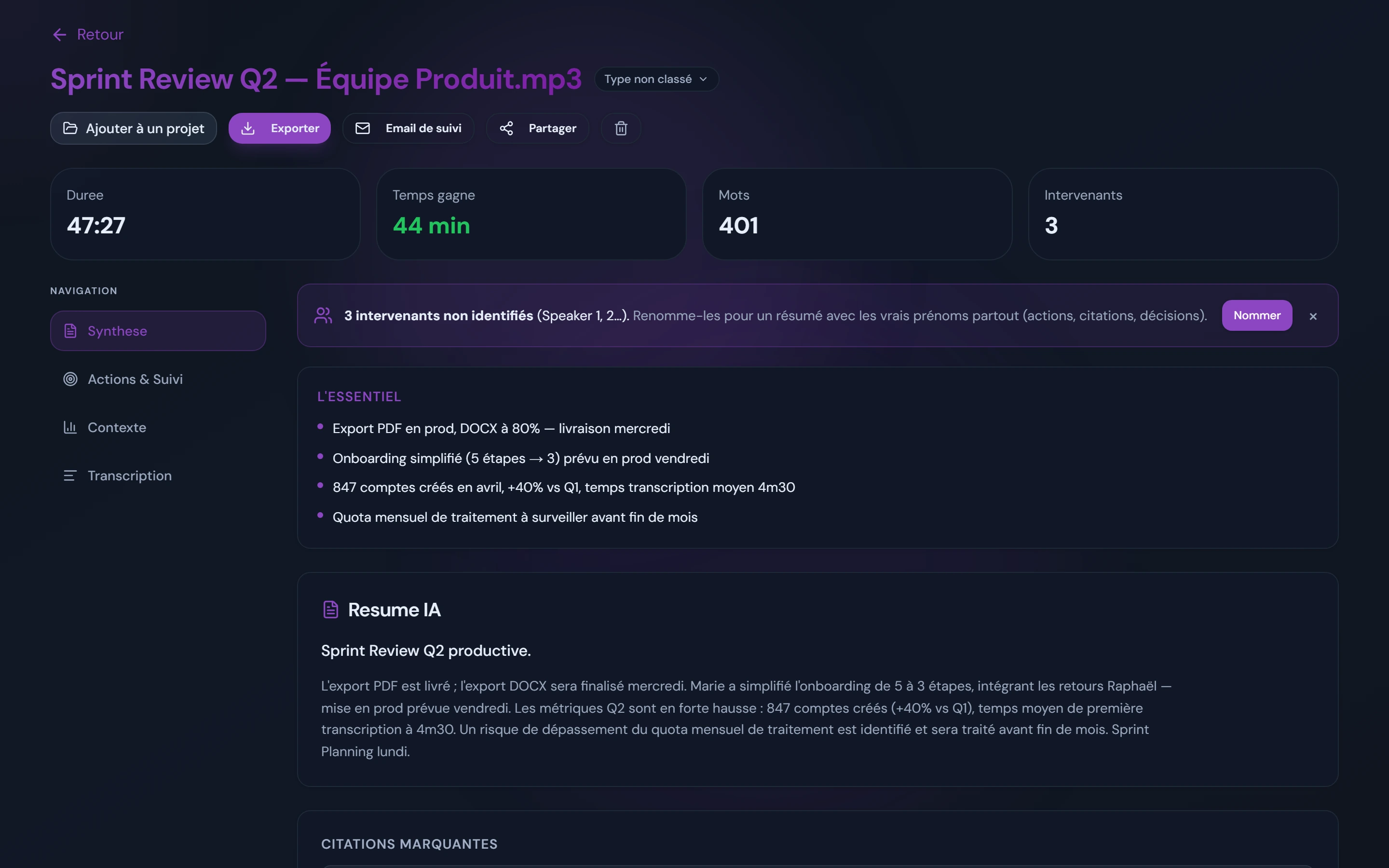
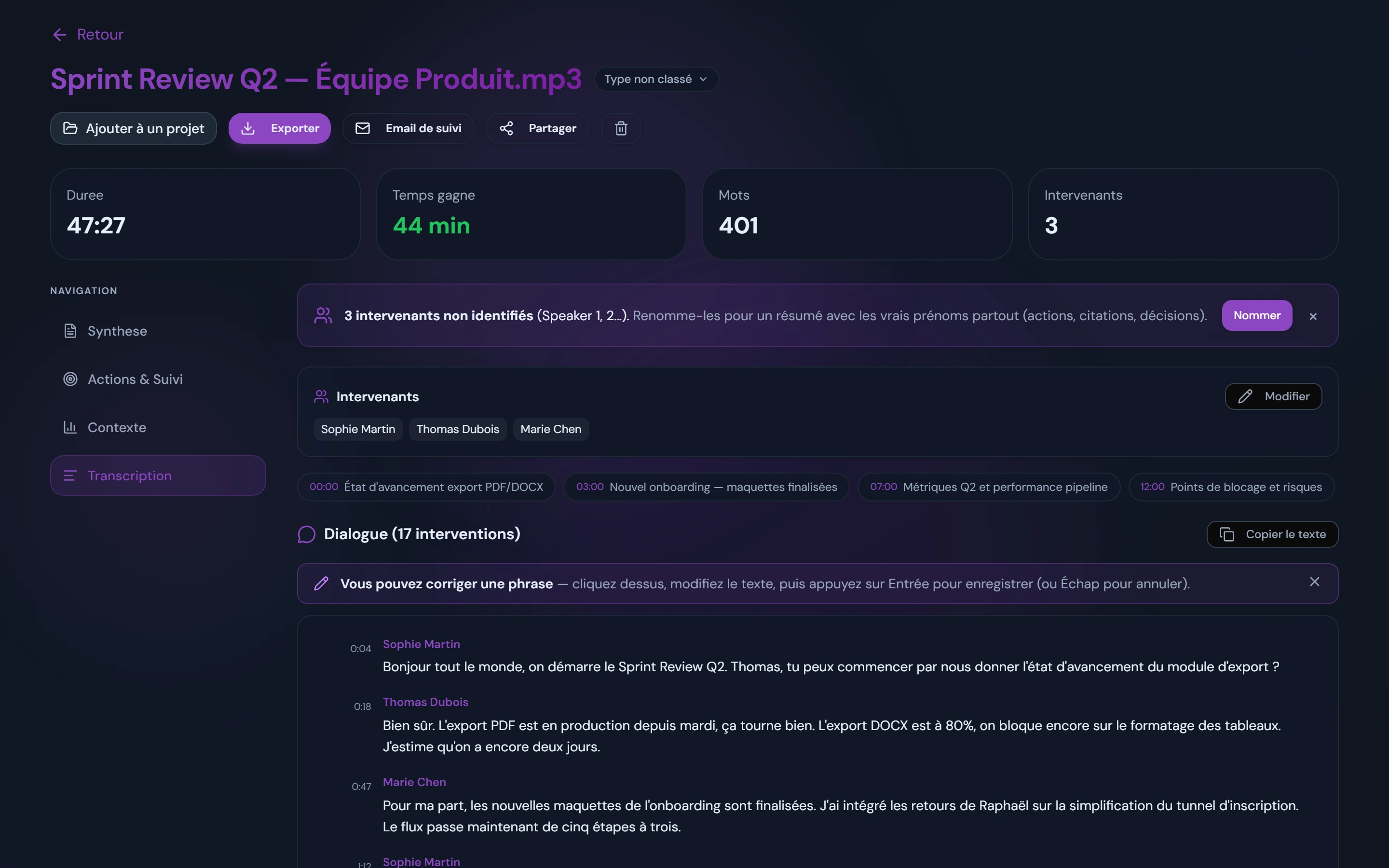
Summary, actions, context, transcription. The AI splits and structures everything while you read the conversation.
0:00 / 0:47
launch_meeting.mp3
Transcription
The demo will start automatically.
AI result
Available once the transcription is complete.
Upload your Zoom, Teams or Meet recording and get a structured recap within minutes: automatic transcription, speakers separated and renamable in one click, data hosted in Europe. Need a quick test? Convert audio to text for free, no sign-up needed.
Transcribe and analyse your meetings
Beyond raw text. Tools that turn your conversations into decisions.
High-quality transcription
Multilingual support, English-first. Handles accents, background noise and multi-voice conversations. Timestamps on every contribution.
[00:01:23] "The next Q3 goal is to prioritise the new integration..."
[00:01:47] "We need to make sure the API is stable before the public launch."
[00:02:03] "Agreed, let's check in tomorrow with the engineering team."
Marie Dupont"What's the status of the marketing campaign?"
Thomas Martin"We're on track, launch is planned for Friday."
Sophie Bernard"Perfect, I'll prepare the press release."
Speakers separated, renamable in one click
Each person's voice is separated automatically. Names can be suggested when they are spoken during the meeting; you confirm them, or rename the speaker (Marie, Thomas, and so on), in one click. Names are kept in every export.
4 angles to get the most from your meeting
Every transcription is analysed across 4 independent tabs. You find the information without re-reading 50 pages.
Tab 1 of 4
Summary
Automatic meeting summary: structured executive recap, ranked key points and standout quotes. You grasp the essentials of a 50-minute meeting in 30 seconds.
TL;DR plus a detailed version
Key points tagged by importance and type
Standout quotes with context
Tab 2 of 4
Action plan
Follow-up actions, decisions made and suggested next steps, extracted automatically. Owners and deadlines are included when they are mentioned in the meeting.
Actions, owners and deadlines extracted when they are mentioned
Decisions made with their rationale
Suggested next steps for after the meeting
Tab 3 of 4
Context
Everything around the conversation: identified risks, quantified metrics, disagreements and external references cited. Ideal for preparing the next discussions.
Risks and points of attention detected
Metrics and figures mentioned, pulled out
Disagreements and trade-offs to close out
Tab 4 of 4
Transcription
The full transcript with timestamps and diarisation: voices are separated automatically and names can be suggested when they are spoken; you confirm or rename them in one click. Searchable, copyable, exportable to TXT, Word or PDF (paid plans).
Word-for-word verbatim, punctuation included
Precise timestamps for each turn of speech
Speakers identified (Marie, Thomas, you rename them)
All your meetings in one place
Your transcriptions, findable and organised
Centralised list, full-text search, filters by project, real-time status. You keep the history of all your recaps without organising anything by hand.
Kept 12 months (Free) to 24 months (paid plans). Manual deletion at any time.
Windows app
Record Teams, Meet or Zoom with no bot in your calls
Captures system audio directly from your PC. No extra participant in your calls, and your guests are not notified of a third-party recording.
Automatic processing after recording. You get the transcription and the summary in your dashboard.
Everything you need to know about AudiosTranscribe.
What is meeting transcription?
The automatic conversion of your audio or video into structured text. AudiosTranscribe goes further by adding a summary plus the decisions made and the follow-up actions.
How does speaker identification work?
Our AI automatically separates each person's voice and first labels them as Speaker 1, Speaker 2. You rename each speaker (Marie, Thomas, and so on) in one click from the interface, and those names are kept in every export.
Which audio formats are supported?
MP3, WAV, M4A, MP4, WebM, OGG, FLAC, AAC and many more. You can also record directly with our desktop app.
Is my data safe?
Yes. AES-256 encryption, processing in European regions, sub-processors bound by contract and listed in our privacy policy, GDPR compliance. Your files are never used to train our models.
How much does AudiosTranscribe cost?
Free: 120 min/month. Starter: 9€/month (400 min). Pro: 24€/month (1200 min). Team: 39€/month for the workspace, up to 20 members and 20 h of transcription pooled. Public sector: custom quote. No credit card required to get started.
How do I record my Zoom or Teams meetings?
Our AI meeting recorder desktop app captures system audio directly, with no bot in your calls. Start the recording, and the file is automatically transcribed and analysed.
What is the difference between transcription and audio transcription?
Both terms mean the same thing: converting an audio recording into text. AudiosTranscribe goes further: the transcription is enriched with a summary, the follow-up actions and speakers separated, renamable in one click.
What is the best meeting transcription software for European teams?
AudiosTranscribe is built for professionals who work in English across Europe, with accurate verbatim transcription, speakers separated and renamable in one click, and an automatic structured summary. Your data is hosted in Europe (native GDPR compliance), no bot joins your calls, and you start for free with 120 minutes per month with no credit card.
How do I automatically transcribe a qualitative interview?
Upload your recording (up to 500 MB, formats MP3/WAV/M4A/MP4 and others) to AudiosTranscribe. In a few minutes the AI produces a word-for-word transcript with timestamps, diarisation (voice separation) and a thematic summary. On a paid plan you can then export to TXT for NVivo or Atlas.ti, or to DOCX for your thesis or dissertation appendices.
Is there a European alternative to Notta, Otter or Fireflies?
Yes: AudiosTranscribe is a European AI transcription software, hosted in Europe and natively GDPR-compliant. The key difference with these US AI notetakers: no bot joins your Zoom, Teams or Google Meet meetings. You record with our desktop app and the audio stays with you. See the detailed comparison AudiosTranscribe vs Notta ›
Which transcription tool is GDPR-compliant?
AudiosTranscribe is GDPR-compliant by design: hosting in Europe, AES-256 encryption, audio deleted automatically after transcription, sub-processors bound by contract and listed in the privacy policy, and your files are never used to train the models. A DELETE account endpoint is available.
How do I get a meeting recap automatically?
1) Upload your audio or video file (or record via our desktop app), 2) AudiosTranscribe produces the verbatim transcription with speakers identified, 3) A structured summary is generated automatically: executive recap, key points, action plan, decisions made and standout quotes. The recap can be exported to DOCX, PDF or TXT, ready to send to your team or client.